uniPaint pixel
A downloadable thingymagic for Windows
Made by humans for humans.
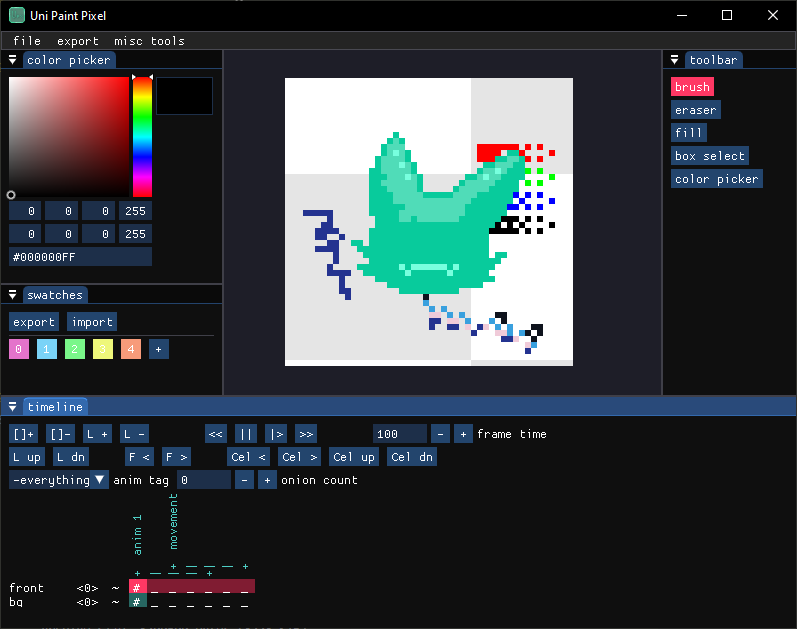
A simple pixel art tool who's currently biggest advantage over other tools is that it is capable of exporting an entire sprite sheet with json metadata, that is complete and doesn't require post processing to fix.
This tool is pretty tough right now, and besides bugfixes and small features I won't be updating it that much, as the codebase will be moved onto my own custom engine later in the year.
Which will bring cool new features such as custom shaders, effects, and many cool and wonderful things.
Hopefully this will be usable and fun! (please let me know of anything I should add)
The app saves a backup file every 5 minutes next to your normal file, make sure the normal file is actually saved tho!
The controls are kinda all over the place, try left and right clicking on things to bring up different context menus, click above frames to add animation tags.
shortcuts that work are:
- delete - to delete current frame
- ctrl+s - to save
- ctrl+o - to open
- ctrl+n - to create new file
- ctrl+shif+ s - to save as
- ctrl+z - to undo changes (no redo yet)
- D, P or B - to select brush
- E - to select eraser
- S - for box selection (works differently from traditional selection)
- C - for color picker
Cool trivia: This app is running most of the graphics on the GPU side and doesn't store them in normal ram, until a file is saved or exported. (this does mean that if your graphics driver crashes, you'll loose all your unsaved work, but it makes the app run incredibly fast (6000FPS when vsync was turned off))
Only thing being saved in normal ram is the history. (there's no limit on history, so make sure to close and reopen the program after like maybe 100000 operations, not that the app couldn't handle it, but your ram might overflow and slow your pc) (I'm still unsure whether this counts as survival horror or no xD)
Changes:
version 0.0.3 - fixed background shader
version 0.0.2 - fixed celCount parameter in json export
(used to report total amount of cels stored in app instead of exported)
Modding: while there's not much to do, some things are exposed.
The shader used for inter layer operations can be found in "assets\blendModes\shaders", and should allow for some silly effects.
The shader in "assets\textureGenerators\plainTexture\checker" can be modified to change the app background.
And the file assets\splash.upp can be modified to change the startup project :D
Download
Install instructions
- download your graphics drivers
- unzip somwhere
- keep all the files togheter
- have fun
Development log
- first bugfix ayeee!!!15 days ago
Comments
Log in with itch.io to leave a comment.
learned my lesson, there is no timing issue in the software. but my monitor has about 30-60ms ghosting 😭